Posts

Showing posts with the label Windows Server

Mastering Windows Service Management with NSSM (Non-Sucking Service Manager)

Windows services play a crucial role in ensuring the seamless functioning of various applications and processes on your system. Managing these services efficiently is essential for maintaining system stability and performance. One powerful tool that simplifies the process of creating and managing services on Windows is NSSM, short for Non-Sucking Service Manager. In this blog post, we will delve into the intricacies of NSSM and guide you on how to leverage its capabilities for effective service management. What is NSSM? NSSM is an open-source utility designed to make Windows service creation and management more straightforward and flexible. Unlike the built-in Service Control Manager (SCM), NSSM provides additional features and functionalities, making it a valuable tool for system administrators and developers. Features of NSSM: Compatibility: NSSM is compatible with all modern Windows operating systems, including Windows 7, 8, 10, Server 2008, Server 2012, and Server 2016. Configurati...
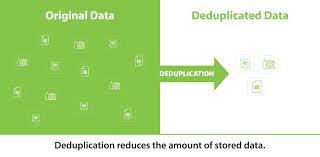
How to enable Windows Server Data Deduplication

Image
SCCM can take a lot of space having to store drivers, wim images and various software. A great way to reduce the amount of space that those items are taking up and stretch your disk space to last longer is to enable Windows Server's built-in file deduplication. Starting in Windows Server 2012 Microsoft released a feature called data deduplication . The built-in data deduplication works on the bit level so files don't need to be exactly the same for the deduplication to work, they only need to be alike down to the bit.  Step 1: Check for File Deduplication Support Before you start, make sure your Windows Server supports file deduplication. This feature is only available on Windows Server 2012 and newer versions. Step 2: Install File Server Role If you haven't already, you'll need to install the File Server role on your Windows Server. This can be done using the Server Manager. Step 3: Install Data Deduplication Feature Next, you need to install the Data Deduplication fea...